Before you arrive: install the toolbox and download the channel files at home. The files are large, and the room network will not carry 100 people downloading them at once. See the Pre-Tutorial Setup Guide.
Reproducible evaluation of underwater acoustic receivers requires the ability to drive any candidate signal through a realistic channel and a realistic noise field, with full control over the experimental conditions. Most researchers solve this problem in private, with code and channel files that never leave the originating laboratory.
The Underwater Acoustic Channel Library, available at github.com/uwa-channels, removes this barrier. It provides eight measured channels, recorded in the North Atlantic, off Martha's Vineyard, across the eastern North Pacific, off Kauai, in a Norwegian fjord, off the coast of Japan, near Singapore, and in the Mariana Trench. Together they span transmission ranges from tens of meters to thousands of kilometers and center frequencies from 75 Hz to 25 kHz. The channel data is archived on Zenodo under doi:10.5281/zenodo.21287414.
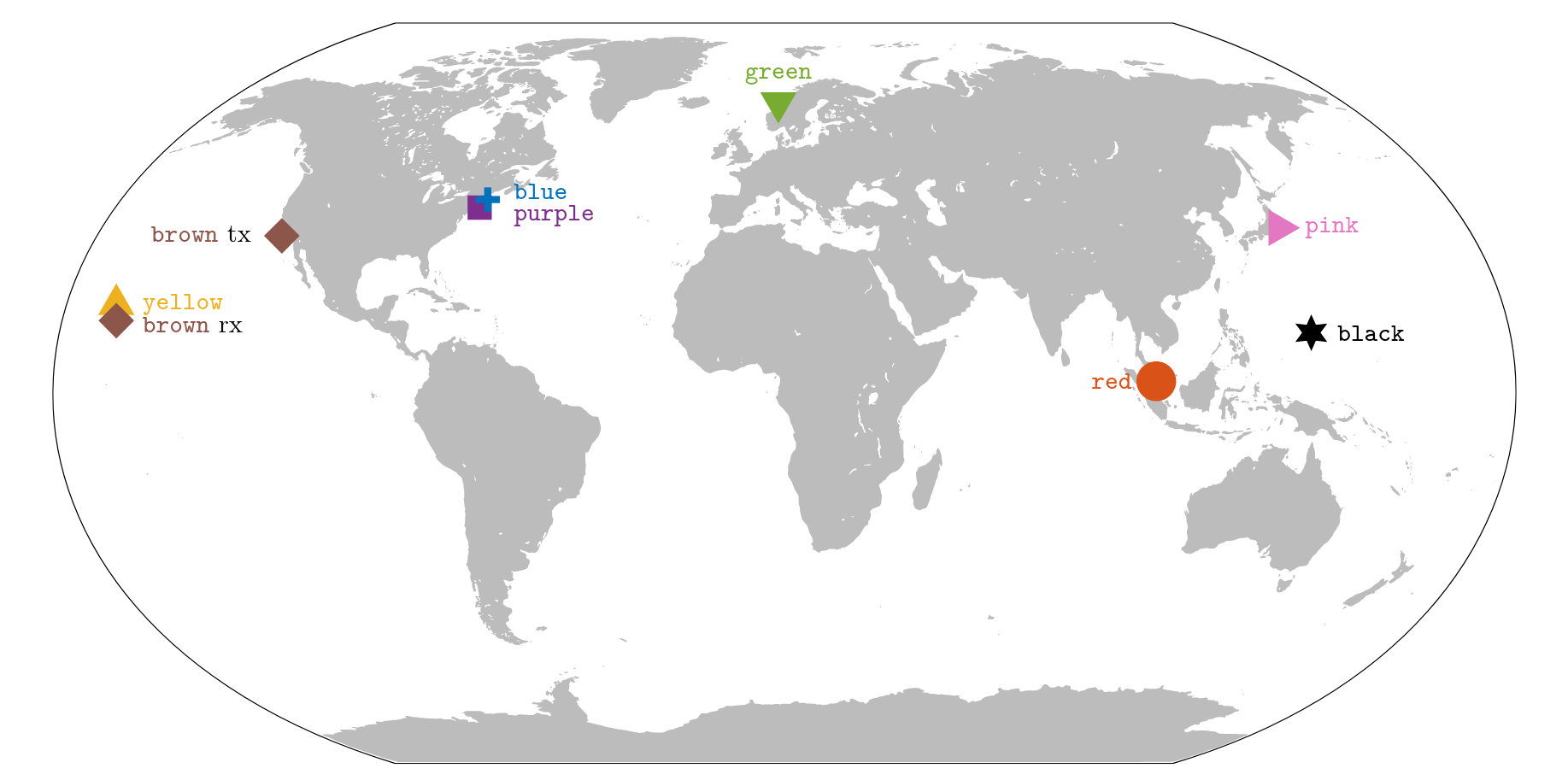
brown channel is marked twice, at its transmitter and its receiver, because the two sit thousands of kilometers apart.
The companion MATLAB and Python toolboxes implement three core operations: replay (pass any signal through a measured channel), noisegen (generate realistic ocean noise), and unpack (reconstruct the full time-varying impulse response from the compressed storage format).
This tutorial walks you through integrating the toolbox into your evaluation pipeline. You will leave with working code on your laptop that replays your own signals through several measured channels and adds realistic noise, and with a clear mental model of the underlying representations and assumptions.
Graduate students, postdoctoral researchers, early-career faculty, and practicing engineers working on underwater acoustic communications, signal processing, channel modeling, or machine learning for ocean signals. The tutorial is also suitable for newcomers from adjacent fields (terrestrial wireless, geophysics, machine learning) who want to access measured underwater data without first running their own sea trials.
By the end of the tutorial, you will be able to:
estimate repository to extract a channel from your own at-sea recordings.Assistant Professor of Electrical and Computer Engineering at The University of Alabama, Tuscaloosa, AL, USA. He received the B.S. degree in Communication Engineering from Shandong University of Technology (2016), and M.S. and Ph.D. degrees in Electrical Engineering from Northeastern University, Boston (2018, 2025). His research interests include statistical signal processing and digital communications, and their applications to underwater acoustic systems. He authored a paper that won the Best Paper Award at the 16th International Conference on Underwater Networks & Systems (WUWNet'22). He is currently an editorial board member of Scientific Reports and Scientific Reviews, an editor of IEEE Wireless Communications Letters, and a lead guest editor for IEEE Journal of Selected Areas in Communications.
Professor of Electrical and Computer Engineering at Northeastern University. She graduated from the University of Belgrade, Serbia (1988), and received M.S. (1991) and Ph.D. (1993) degrees in electrical engineering from Northeastern University. She was a Principal Scientist at the Massachusetts Institute of Technology and in 2008 joined Northeastern University. She is also a Guest Investigator at the Woods Hole Oceanographic Institution. Her research interests include digital communications theory, statistical signal processing and wireless networks, and their applications to underwater acoustic systems. She is an Associate Editor for the IEEE Journal of Oceanic Engineering and chairs the IEEE OES Technical Committee for Underwater Communication, Navigation and Positioning. Milica is the recipient of the 2015 IEEE OES Distinguished Technical Achievement Award, 2018 IEEE OES Distinguished Lectureship, 2019 IEEE WICE Outstanding Achievement Award, and 2023 IEEE Communications Society's Stars in Computer Networking and Communications Award. In 2022, she was awarded an honorary doctorate from Aarhus University in Denmark and was elected to the Academy of Engineering Sciences of Serbia.
Half-day single-track event (4 hours), held on the morning of Monday, September 21, 2026, within the OCEANS 2026 workshops and tutorials block. Please bring your laptop with the software pre-installed (see Setup Guide).
| Time | Session |
|---|---|
| 08:30 – 09:30 | Introduction Overview of underwater acoustic channels: propagation physics, multipath and Doppler, time variability, and the channel estimation methodology underlying the Library. |
| 09:30 – 10:10 | Module 1: Replay Load a channel file, inspect its contents, generate a BPSK probe signal, call replay to drive it through the channel, and plot the received waveform, cross-correlation, and spectrum. Hands-on exercise with a channel and probe of your choosing. |
| 10:10 – 10:30 | Coffee Break ☕ |
| 10:30 – 10:50 | Module 2: Ocean Noise Call noisegen in three configurations: pink Gaussian (17 dB/decade slope), spatially correlated Gaussian across a multi-element array, and impulsive symmetric alpha-stable. Each configuration is followed by a diagnostic exercise. |
| 10:50 – 11:10 | Module 3: Unpack & Visualize Use unpack to reconstruct the full time-varying impulse response, visualize its evolution as a delay-time waterfall, and identify physical structures (direct path, surface/bottom bounces, Doppler-induced delay drift). |
| 11:10 – 11:40 | Module 4: The Library at a Glance Overview of the eight hosted channels, their geographic and parametric coverage, and criteria for choosing a channel. Walkthrough of the documentation website, the Zenodo record, and the GitHub organization layout ( matlab, python, estimate). |
| 11:40 – 12:20 | Module 5: The estimate RepositoryWalkthrough of the companion repository: estimator pipeline, probe signals and constraints, visualization scripts. Attendees with at-sea recordings can attempt a first estimation pass. |
| 12:20 – 12:30 | Wrap-Up Contribution workflow for submitting newly estimated channels, overview of the GitHub discussion forum, and Q&A. |
All materials will be available here before and after the tutorial. Template scripts will be provided in both MATLAB and Python.
Presentation slides for each module will be posted here before the tutorial.
Coming soon
Hands-on exercise templates in MATLAB and Python for each module.
Coming soon
Complete solutions for all exercises, available during and after the tutorial.
Coming soon
Two representative channel files, archived on Zenodo under doi:10.5281/zenodo.21287414. We will announce which two ahead of the event. Please download them before the tutorial.
After the tutorial: All materials (slides, templates, reference solutions, and a recording of the live demonstrations, if one is made) will be archived here and remain freely available.
Please complete the following steps before arriving at the tutorial so that the in-room network is not a bottleneck. A detailed setup guide will be emailed to registered attendees two weeks before the event.
Download the channel files at home. A single channel file is around 200 MB, so the two files plus their noise files come to roughly half a gigabyte. Allow 1 GB of free disk space, and start the download the evening before at the latest. Conference wireless will not carry a room of attendees fetching half a gigabyte each at 09:30.
pip install uwa-channels
example_replay.py from the Python toolbox repository.matlab.addons.install(websave([tempname '.mltbx'], 'https://github.com/uwa-channels/matlab/releases/latest/download/uwa-channels.mltbx'))This downloads the latest release and installs it as an add-on, so
replay, noisegen, and unpack are on your path in every session. You can also download uwa-channels.mltbx from the latest release and double-click it.
example_replay.Take this route if you want to read or modify the source, or if you are running Octave 9.0 or later, which cannot read .mltbx files.
git clone https://github.com/uwa-channels/matlab.git
cd matlab
install from that folder in MATLAB or Octave. This adds src and examples to the search path and saves the path for later sessions.Do not use Options B and C at once. If the add-on is installed and you also run install, two copies sit on the path and load order decides which one wins.
If you cannot install anything on your laptop, or your MATLAB license will not travel with you, both toolboxes still run.
Important: Please complete the setup and download the channel files before arriving. The hands-on exercises start at 09:30 and assume a working environment on your laptop.
Questions about the tutorial itself can go to Zhengnan Li. Questions about the toolboxes are best raised as an issue on GitHub, where the answer helps everyone.
 OCEANS 2026 Tutorial